A companion for Traktor Pro 3 / 4
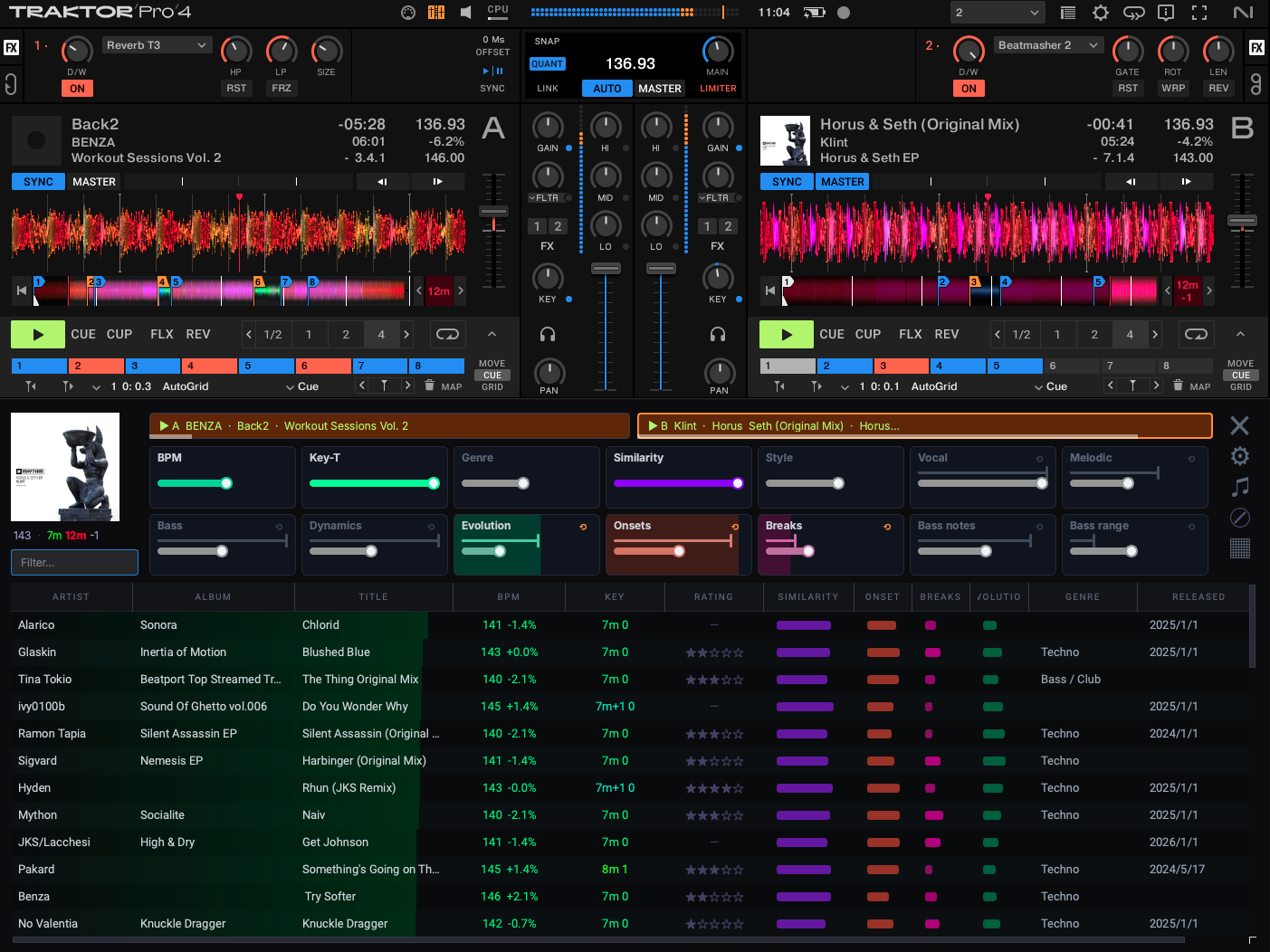
Find the next track. It analyses your library, watches what is playing, and puts the tracks that actually fit the current deck in front of you — then loads the one you pick, with the transition already set up.
Take that library to the club. It writes a USB stick CDJs read on their own — beat grids, hotcues, waveforms, playlists — straight from your Traktor collection. No Rekordbox in the middle, no re-analysing everything in someone else's software.
Runs on macOS and Windows, beside Traktor, on your own machine. Nothing is uploaded anywhere.
What it does
Finding the next track
- Analyses your collection — BPM, musical key, and a set of perceptual features (energy, mood, vocal/instrumental, style) from CLAP, an audio model that runs locally. Your files never leave the machine.
- Watches the deck — a small QML bridge inside Traktor reports what is playing, which deck is on air, and where the faders are.
- Ranks the rest of your library against it on the axes you care about: tempo, harmonic compatibility, energy, style, bassline and structure, and whatever else you weight in Settings → Matching.
- Finds tracks that fit once transposed — a semitone or three on Traktor's Key knob opens up matches the wheel alone would never offer. The shift is shown beside the key, and set on the deck when you load.
- Loads the track you choose onto any deck, by synthesizing a real drag or by driving Traktor's browser — and then, optionally, silences the channel, switches the headphone cue, beat-syncs, plays, and ramps the fader back up.
- Auto DJ — does all of that by itself before the current track runs out.
- Drives from an S4 MK2 — the browse encoder and the CH1–CH4 CUE buttons navigate and load, so you never touch the laptop. Every control is rebindable in Settings → Controls.
- Shows you your library — feature distributions, spread and correlations across everything you have analysed (⌘⇧S / Ctrl+Shift+S).
Taking it to the club
- A USB stick a player reads on its own —
PIONEER/export.pdband the per-track.DAT/.EXTanalysis, written directly fromcollection.nml. Rekordbox is not needed to produce it and does not have to be installed. - Your Traktor work travels with it — beat grids, hotcues and loops, BPM, musical key, ratings, and your playlists (smart ones evaluated at export time).
- Rekordbox reads the stick as it is — it appears under Devices, with waveforms and cues, and tracks drag from there into a collection.
- Traktor playlists ride along —
Traktor/<name>.nml, each track carrying its cues and grid exactly as your collection has them. Import Playlist in Traktor on any machine. - Add or replace, resumable, with progress and time remaining for every phase. Stopping leaves a stick that still plays; running it again adds the rest and re-decodes nothing.
- Audio is filed by artist and album and folded to ASCII, which is what older players expect.
Tested on an XDJ-1000: a full 870-track export loads there with waveforms and hot cues, and another all-in-one unit browsed the stick's tracks and playlists. Not every player has been tried yet. The newer models that read only the OneLibrary database (CDJ-3000X, CDJ-1500X, XDJ-AZ, OPUS-QUAD, OMNIS-DUO) are still untested, though Rekordbox accepts that database. On one of those, try a spare stick first. Details in docs/rekordbox-export.md.
Housekeeping
- Detects missing hotcues across the collection and writes them back into
collection.nml(with a backup). - Fills missing genre, label, catalog number and release date from Discogs. Tracks are looked up in the background and what is found is kept; the empty fields in Traktor are filled only when you say so, after a preview.
- Fixes wrong beat grids from the mix. Nudge a track into place by ear, right-click the deck, and the offset Traktor's phase meter is showing is queued — written to the grid marker later, when Traktor is closed.
Contributing
Bug reports and feature requests go to the issue tracker. Please attach the log (see Troubleshooting) and say which OS and Traktor version you are on. Track Kommander is distributed as ready-built installers; the source code is not published here.
Licence and attribution
Track Kommander is free to use, but not open source. The installers are distributed under the terms in LICENSE: install it on as many of your own machines as you like and use it for paid gigs, but do not redistribute, modify or reverse engineer it. Copyright © 2026 w0ts.
It is built on open-source components, which keep their own licences: Qt
(PySide6), FFmpeg, libsndfile and soxr under the LGPL, the rest permissive.
FFmpeg is an audio-only build free of GPL components
(scripts/build_ffmpeg_lgpl.sh), and its complete source ships inside the
app. THIRD_PARTY.md walks through the whole audit — every
dependency, every licence, and which machine-learning models are bundled and
why the non-commercial ones are not. The full texts ship inside the binaries
under licenses/, reachable from Settings → About.
Not affiliated with Native Instruments
Track Kommander is an independent project. It is not affiliated with, endorsed by, or sponsored by Native Instruments GmbH. "Traktor", "Traktor Pro" and "Traktor Kontrol" are their trademarks, used here only to describe the software this tool works with. "Rekordbox" and "CDJ" are trademarks of AlphaTheta Corporation. Track Kommander uses Discogs' API but is not affiliated with, sponsored or endorsed by Discogs; "Discogs" is a trademark of Zink Media, LLC.
No Native Instruments code is included — the QML bridge the app installs was written for this project against Traktor's public controller API.